Product
Features
mttick prepares real prices and spreads for the MetaTrader 4 (MT4) strategy tester. Each item says what it does and what it does not do. What does not exist yet comes last.
Backtesting
Real tick backtests
Every tick in the backtest is a quote that was recorded.
As many ticks are written as the tester processes. In one measurement (MT4's bundled Moving Average, EURUSDm H1, 2025-01-13 to 01-17) the tester log shows 258,555 tick events, exactly the number written.
What it does not do: it is for the "every tick" model only. Optimization mode is not supported yet; when you press Start, it tells you so and does not start, and it does not quietly switch to MT4's own data. For what data there is, see Data coverage.
Variable spread and spread presets
The spread comes from the data tick by tick, not one fixed number.
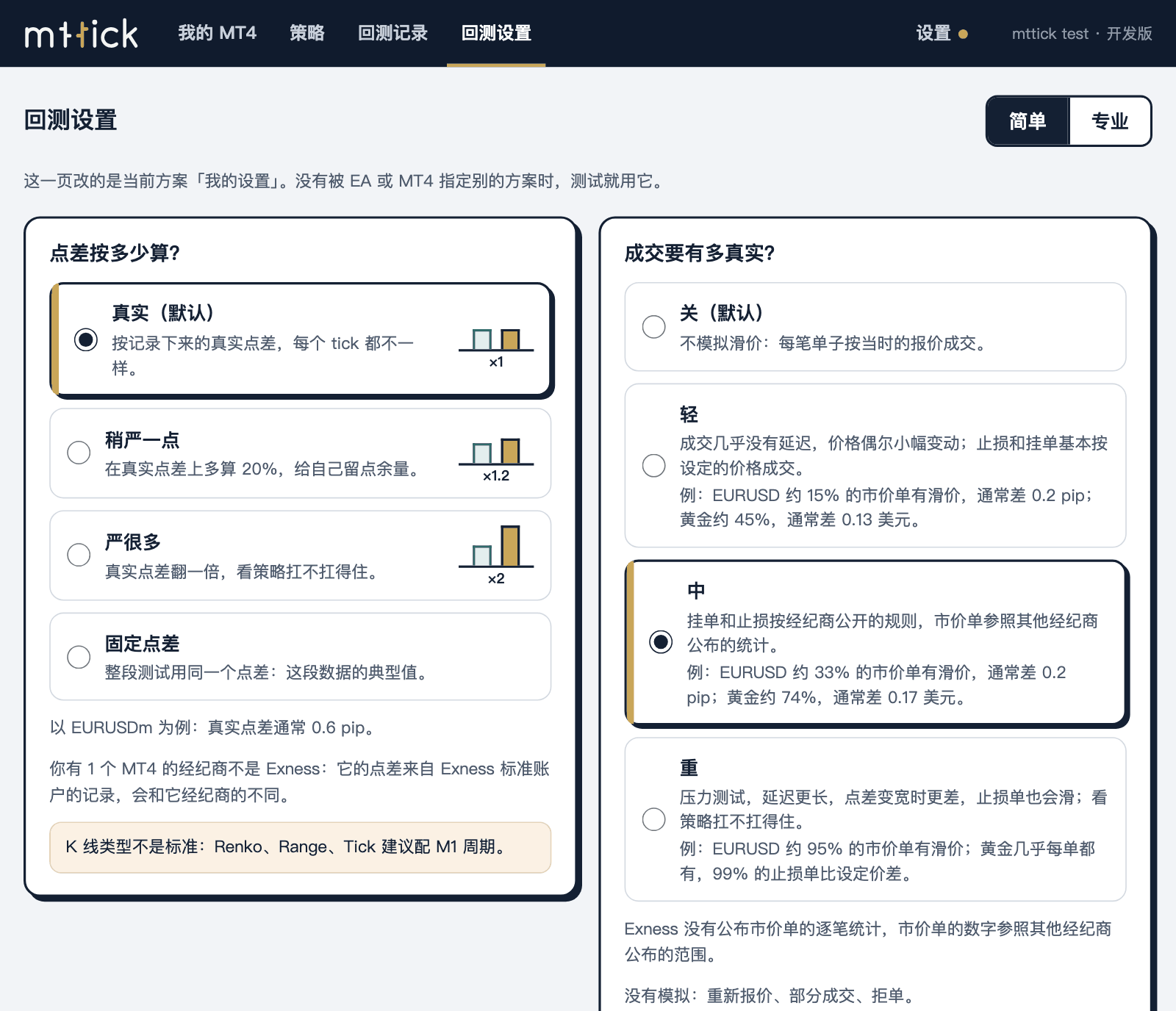
Backtest settings has four spread cards: "Real (default)", "A bit stricter" (the real spread plus 20%), "Much stricter" (the real spread doubled) and "Fixed spread" (one spread for the whole test). Pick another card and press Start, and you have run a stress test.
The same EA, the same week: with a fixed spread of 10 points (1 pip) the total net profit is 47.74, with the real spread 48.64, with the real spread doubled −192.20. MT4's bundled Moving Average, EURUSDm H1, 2025-01-13 to 01-17. One sample; it shows only the direction.
What it does not do: the cards change only the spread, not the price. The bid is always the bid that was recorded.
Fill slippage (optional)
Off by default. To use it, choose "Light", "Medium" or "Heavy" under "How realistic should fills be?" in the backtest settings.
A market order fills after a short delay, at a price taken from how the real ticks moved during that delay. When a pending order or a stop meets a gap, the free-of-slippage range decides where it fills. With the same settings and data, the slippage is identical in every run.
What it does not do: it does not simulate requotes, partial fills or rejected orders. Exness does not publish per-trade statistics for market orders, so the market-order figures follow ranges published for other brokers; they are not your broker's real fills.
Account conditions as you set them
Commission, leverage, lot sizes and stop-out level can follow your account.
Commission is entered per lot, round trip. Leverage, minimum lot, maximum lot, lot step and stop-out level work the same way. Each can be left empty: empty uses the broker's value, and a value you enter is used instead.
What it does not do: it does not guess your conditions. If your account's values have not been read yet, mttick reminds you before it starts.
Multi-timeframe history, built for you
An EA that tests on H1 and also reads M15 or H4 gets its history too.
mttick builds the history of nine timeframes from the same ticks and puts it in a folder with mttick in its name. During the backtest MT4 reads it step by step with simulated time and never sees the future. The history files your broker saved are not changed by a single byte.
What it does not do: it does not replace the history on your charts.
Data
Where the backtest's prices come from is your choice, and you do not download anything yourself.
Choice of source: Dukascopy or Exness
The data source is one of the backtest settings: Automatic (Exness Standard account), Dukascopy, or another Exness account type.
Change the source for the same EA and the spread and quotes differ, so the result differs. For gold, for example: Dukascopy's spread is about 0.4 to 0.8 USD and moves with the price; the Exness Standard account is about 0.16 to 0.26 USD and hardly moves. Neither side is wrong. Choosing a data source
What it does not do: it does not judge which source is better. Compare which one looks more like your broker.
Shared tick data, downloaded as needed
The data is kept on our servers, one copy that everyone shares, compressed by day.
When you press Start, mttick downloads to this computer only those days of your chosen dates that it does not have yet. Each download is checked for completeness first and used only if it passes. Several MT4 copies share the same download.
There are 107 symbol series now, with XAUUSD starting in 2015-08. The full table is on Data coverage.
What it does not do: it does not upload your ticks, and you do not have to download raw files from Dukascopy or Exness yourself.
Several MT4 copies, several EAs
If you have more than one MT4 and more than one EA, you manage them in the mttick window.
My MT4
One card per MT4, with the price data shared.
The card says whether this MT4 has mttick switched on, whether its version is supported, and how many real ticks the last backtest used. You can rename it, remove it, or add an MT4 from a folder by hand; you can also put several MT4 copies in a group and open them together.
What it does not do: it does not change MT4's program files; removing an MT4 only means mttick stops managing it, and its files are not deleted.
Run in parallel
Several backtests run on this computer at the same time, and each one is an ordinary backtest.
In an MT4's menu choose "Run in parallel…", pick the parameter files (.set), EAs or symbols to compare, and press Start once. mttick makes a few work copies of this MT4, one backtest runs in each, and when they finish the results go into the run records, where you can compare them side by side. How many run at once depends on your computer's cores and memory, and you can lower it.
The same task gives the same report whether it runs alone or in parallel: in one test we compared 13 reports, and apart from the report name they did not differ by a byte. How much faster depends on your computer: measured once, on a virtual machine with 4 logical cores, 2 in parallel took about 63% of the time of running them one after another, 3 about 56%, and 4 about the same as 3. That is a single measurement.
What it does not do: the work copies have no account and do not log in, and they are ordinary folders you can see. mttick asks before it makes them. MT4 may contact outside servers when it starts; mttick does not control that.
Create a new MT4
Copy one you already have, or install a fresh one with the installer.
A new MT4 is a separate folder. The original is not touched, and the new one appears in "My MT4". Removing it only means mttick stops managing it. It is useful when you want a separate MT4 for different EAs or different brokers.
What it does not do: it does not open an account for you or log in.
Strategies
One file per EA, kept on your own computer.
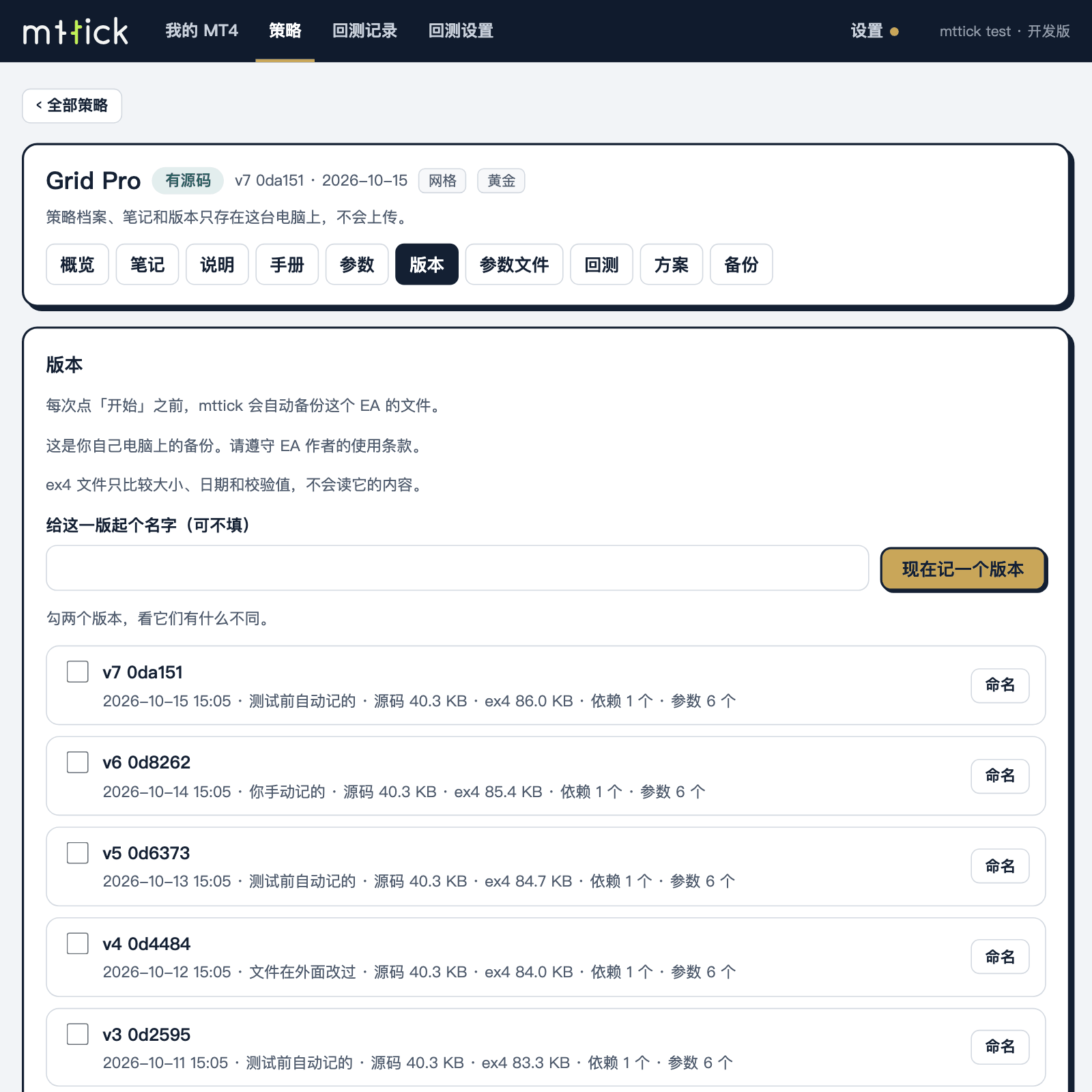
The file holds notes, parameter files (.set), version backups and backtest results. Before each Start, mttick backs up this EA's
.mq4or.ex4as a version on your computer, and the run record says which version was used. It also remembers the spread and fill model this EA used last time.What it does not do: an EA that has only an
.ex4and no source also gets a file, but mttick does not read the contents of an.ex4and does not decompile it. Nothing in the file is uploaded. There is no code editor yet, and you cannot compile in mttick.
Everyday use
Switched on when MT4 opens
Install once. After that, whenever you open MT4, the tester has the mttick tick box.
This relies on a Windows setting. The installer asks you first, and it needs one administrator confirmation. You can switch it off in mttick any time, and uninstalling removes it.
What it does not do: it does not change MT4's program files. If another program already uses this setting, mttick does not overwrite it. An MT4 without mttick works as usual.
Visible
mttick has a window and a tray icon.
In the window's "My MT4", each MT4 has a card: whether mttick is switched on and how many real ticks the last backtest used. During a backtest, the text beside the tick box in MT4 shows the data range and the progress of the preparation.
What it does not do: it does not hide files or processes and does not evade antivirus software. Everything it writes into the MT4 folder is listed in the docs page "What mttick does on your computer".
The network is used for two things
Checking the subscription and downloading the price data you ask for.
mttick does not upload the list of MT4 copies found on your computer, broker server names, account login numbers or how your backtests ran, and it does not upload the computer's name: the device name in the subscription check is one you type yourself, "My computer" by default.
What it does not do: it cannot work without the network entirely. Checking the subscription sends the subscription code, an identifier of this computer (hashes of several identifiers, not the originals) and the device name; when data is downloaded, the server knows which symbol and which dates you asked for. Details in What mttick does on your computer.
Professional mode
Non-time bars, time zone and spread multiplier are in professional mode.
Renko, Range and Tick bars, server time zone and daylight saving, spread multiplier and minimum spread. The defaults for the spread multiplier and minimum spread normally do not need changing.
What it does not do: it does not detect your broker's time zone. How H4 and daily bars are cut depends on it, so keep it the same as your broker's. Non-time bars are best used with the M1 timeframe. Heikin-Ashi is not supported.
Not available yet
These are not built yet. There are no dates, and they will not appear in the software until they are ready.
The modelling quality in the report
The report's "modelling quality" field currently shows n/a. This is a display issue, not a statement about the data quality.
MT5
Not supported. MT5's tester is built differently, and there is no date.
More symbols and longer history
What is available now is on the data coverage page. More symbols and more history are added over time.
AI reading of a backtest report (planned, optional)
After a backtest, one click gives a plain-language reading: how the result looks, what to be careful about, what to test next. mttick works out the numbers on your computer and the AI only narrates them. What would be sent is shown to you first and goes out only when you press the button. Optional and off by default. Not available yet, and there is no date.
Next
Three steps to your first backtest, and a 14-day trial first.